
Last updated: 2026-06-02
Sources reviewed: This comparison uses SAFVR product materials and public Intenseye pages reviewed on June 2, 2026, including Intenseye's Sentinel product page, EHS Suite page, enterprise readiness page, and data privacy page. Product pages change; verify current vendor capabilities during procurement.
Quick Answer
When buyers research Intenseye competitors, the shortlist is short: a small cohort of computer-vision safety platforms — including SAFVR, Soter Analytics, and regional vendors — compete on detection coverage, workflow automation, and how far the platform goes beyond alerts. Public Intenseye materials reviewed for this page describe camera-first safety detection, alerting, workflows, reports, and enterprise deployment options. SAFVR is positioned as a closed-loop Safety Intelligence Platform that runs a continuous cycle: detect hazards, automate actions, generate site-specific training, and surface predictive leading indicators. Validate exact capability coverage, deployment model, and data-processing terms with each vendor before selection.
Intenseye Competitors: How the Shortlist Stacks Up
Most teams evaluating Intenseye competitors are comparing three things, not just feature lists: (1) the breadth of what each platform detects on existing IP cameras, (2) what happens after the alert — alerting-only vs. a closed loop of investigations, corrective actions, and micro-training, and (3) the depth of prevention analytics, including leading indicators, cross-site correlation, and structured risk-review reports. SAFVR sits in this competitor set as the closed-loop option; for a parallel teardown of another camera-first vendor, see our SAFVR vs Soter Analytics comparison, and for the broader category framing, the Safety Intelligence Platform overview.
Introduction: Why Buyers Compare These Two Platforms
If you're evaluating an Intenseye alternative or surveying Intenseye competitors more broadly, SAFVR is almost certainly on your shortlist. Both platforms use computer vision AI with existing IP cameras to reduce workplace incidents — but the similarities stop at the camera feed.
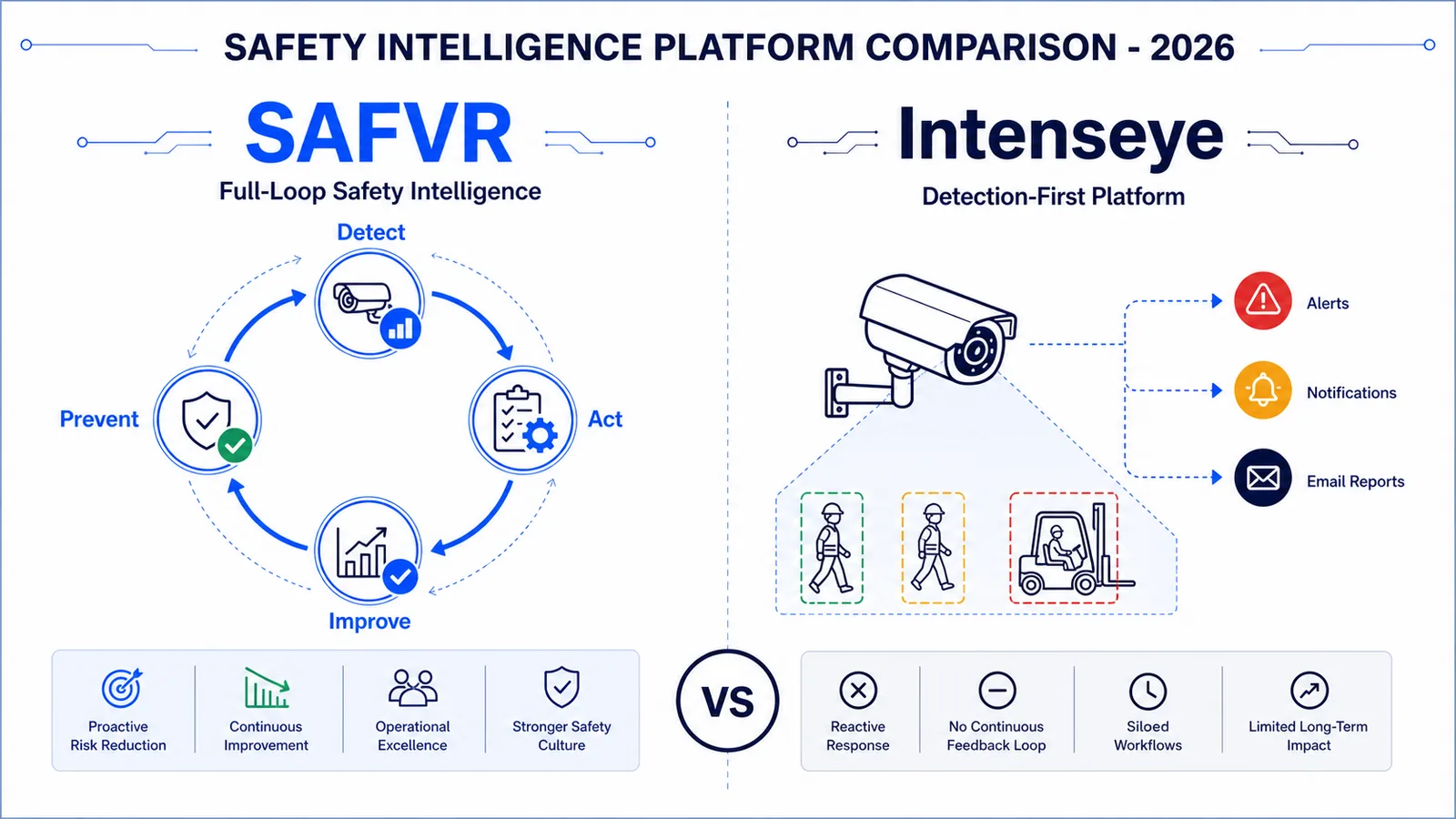
Public Intenseye materials describe a camera-first safety platform for real-time detection, alerting, workflows, reports, and post-action insight. SAFVR's AURA engine runs a continuous four-phase loop: DETECT → ACT → IMPROVE → PREVENT.
This comparison covers capabilities, deployment, integration, and which organization each platform serves best.
Related: See our dedicated Intenseye comparison page for a side-by-side feature breakdown.
At a Glance: SAFVR vs Intenseye
| Capability | SAFVR | Intenseye |
|---|---|---|
| Core architecture | Closed-loop Safety Intelligence Platform (Detect → Act → Improve → Prevent) | Camera-first detection and real-time alerting |
| Detection categories | 9 layers: PPE, falls/slips, restricted zones, vehicle-pedestrian, unsafe acts, ergonomics, housekeeping, environmental, near-miss | PPE compliance, ergonomic risk, vehicle interactions, housekeeping, unsafe acts |
| Workflow automation | 9 agentic workflows: investigation, JSAs, permits, corrective actions, inspections, training, hazard follow-up, audits, mitigation | Alert routing, case management, basic task assignment |
| Training generation | Site-specific micro-training workflows from detected events and SOP context | Public Intenseye materials emphasize alerts, reports, workflows, EHS workflows, and post-action insights |
| Predictive intelligence | Leading indicator reports, cross-site correlation, and risk-review analytics | Public Intenseye materials describe alerts, reports, workflows, impact measurement, and safety scores |
| Camera compatibility | Existing IP cameras (RTSP, ONVIF, MJPEG); no proprietary hardware required for core deployments | Public Intenseye materials describe Sentinel devices and compatibility with existing CCTV through Sentinel Hub |
| Deployment model | Edge or cloud options scoped by customer environment | Public Intenseye materials describe local processing through Sentinel hardware and enterprise deployment options |
| Integrations | EHS platforms, IoT sensors, ERP, BI tools, Teams, Slack, SMS | Public Intenseye materials describe existing-system integration and EHS workflow support |
| Pricing model | Per-camera, per-site, or enterprise; scoped paid pilot | Public pricing varies by scope; verify current terms with Intenseye |
| Primary industries | Manufacturing, warehousing/logistics, construction, energy, chemicals | Public Intenseye materials show industrial safety use cases, including manufacturing and high-risk operations |
| Geographic strength | Global deployments supported by customer scope | Verify current regional support with each vendor |
| Offline capability | Offline-capable workflows can be scoped for selected modules | Verify current offline behavior with Intenseye for the deployment model being evaluated |
Detection & Computer Vision
Intenseye: Camera-First, Real-Time Detection
Intenseye's strength is detection speed and manufacturing-floor accuracy. The platform connects to existing cameras and runs computer vision models trained on PPE compliance, ergonomic risk, forklift-pedestrian proximity, and housekeeping violations.
Public Intenseye capabilities to validate:
- Time-to-first-detection: Confirm expected setup timelines for your camera network and hazard classes.
- Manufacturing-line use cases: Validate performance against your camera angles, lighting, and repetitive-motion workflows.
- Real-time alerting: Confirm alert latency, escalation paths, and evidence retention.
Questions to validate in procurement:
- Which detections are available on existing CCTV versus Sentinel devices?
- Which workflow steps are native versus integrated with another EHS system?
- What data leaves the site under each deployment model?
SAFVR: Site-Specific, Multi-Signal Detection
SAFVR's DETECT layer covers nine risk categories and is fine-tuned to each facility's cameras, angles, lighting, and risk profile. Detection is the trigger for everything that follows.
Where SAFVR differentiates:
- Site-specific model training: Calibrates during 48–72 hour onboarding, then retrains weekly. Source: pilot benchmark data.
- Multi-signal fusion: Designed to combine camera vision with IoT sensors, EHS records, and audit findings where those data sources are connected.
- Near-miss pattern detection: Correlates events across cameras, zones, and shifts.
- Evidence trail: Timestamped records with video, location metadata, and severity scoring, designed to support review and audit workflows.
Detection accuracy note: Accuracy depends on camera placement, lighting, hazard class, thresholds, and review methodology. Require each vendor to provide pilot-specific precision/recall, false-positive, and false-negative reporting before rollout.
The Verdict on Detection
Both platforms should be evaluated on your camera feeds and hazard classes. If detection needs to feed downstream action, training, and risk review, SAFVR's architecture is designed around that loop. If you are evaluating Intenseye, confirm whether the required capability is available through existing CCTV, Sentinel devices, or another deployment path.
Action & Workflow Automation
This is where the platforms diverge most sharply.
Intenseye: Alert-First, Manual Follow-Through
Public Intenseye materials describe real-time detections, alerts, reports, workflows, and EHS workflow support. During evaluation, ask which workflow steps are native, which require integrations, and how close-out evidence is stored.
This can be a good fit if your organization already has strong manual processes and primarily needs better hazard visibility. During procurement, confirm which follow-through steps are native, which require integrations, and which remain manual.
SAFVR: Agentic, Closed-Loop Action Workflows
SAFVR's ACT layer treats every detection as a workflow trigger. Nine agentic workflows run automatically:
| Workflow | What It Does |
|---|---|
| Incident Investigation | Auto-populates reports with evidence and root-cause prompts |
| Job Safety Analyses (JSAs) | Generates JSAs from live risk data, not recycled templates |
| Safety Inspections | Adaptive checklists based on the last 7 days of site detections |
| Permit-to-Work | Digitises permit lifecycle with conflict detection and audit trails |
| Corrective Action Tracking | Auto-assigns tasks with deadlines, reminders, and escalation chains |
| Training Completion Tracking | Links training to detection events and tracks completion as evidence |
| Hazard Observation Follow-up | Tracks every observation to resolution with reporter feedback |
| Site Audit Coordination | Compiles audit-ready evidence packages by regulation and date range |
| Safety Mitigation Actions | Auto-generates mitigation plans for recurring risk patterns |
Key differentiation: A forklift-pedestrian near-miss in SAFVR auto-creates an investigation, assigns corrective actions, triggers micro-training, and logs the entire chain as audit evidence. The detection closes a loop, not a ticket.
Explore: See how safety compliance automation closes the gap between detection and resolution.
Training & Continuous Improvement
Intenseye: Training and Post-Action Workflows to Validate
Public Intenseye materials reviewed for this page emphasize detections, alerts, reports, workflows, EHS support, and post-action insights. If training content, assignment logic, or site-specific lessons are important to your program, validate what is native, what is configured during implementation, and what depends on another learning system.
SAFVR: Incident-to-Training Pipeline
SAFVR's IMPROVE layer converts detected incidents into site-specific micro-training automatically. The pipeline runs in under 4 hours:
- Detect — AURA identifies an unsafe act, near-miss, or PPE violation.
- Investigate — ACT workflow generates root-cause analysis and corrective actions.
- Generate — IMPROVE creates a micro-learning module from the actual incident video and site-specific rules.
- Deliver — Module is auto-translated (12+ languages) and pushed to affected workers' devices.
- Assess & Log — Workers complete a scenario-based assessment; results are logged as digital corrective-action evidence.
Training completion, assessment quality, and behavior-change signals should be measured during the pilot. SAFVR reports completion and follow-up patterns by site, but results vary by workforce, language coverage, supervision model, and rollout quality.
Additional capabilities include dynamic toolbox talks from the last 7 days of site events, job-specific training paths, and Safety Copilot AI — a conversational assistant trained on your SOPs and regulations.
Learn more: See how incident-based micro-training turns real events into lessons that stick.
Predictive Intelligence & Leading Indicators
Intenseye: Trend Analysis and Heat Maps
Intenseye provides dashboards showing detection trends, zone-level heat maps, and frequency analytics. This is valuable tactical intelligence — it tells you where problems are happening now and historically.
SAFVR: Cross-Site Predictive Prevention
SAFVR's PREVENT layer goes beyond trends to predictive risk modeling:
- Leading indicator reports: Correlates detection frequency, action close-out times, training completion, and near-miss patterns to surface emerging risk before incidents occur. Source: anonymized deployment data.
- Cross-site pattern recognition: Identifies risk patterns spanning multiple facilities.
- Shift and time-based risk forecasting: Surfaces which shifts and conditions correlate with higher incident probability.
- Risk-review analytics: Structured reports designed to support broker, insurer, and internal risk discussions. Outcomes vary by carrier, policy, loss history, and deployment evidence.
The critical difference: SAFVR's predictive models are fed by data from all four AURA phases. A platform that only sees detections can only predict based on detections. One that sees detections, actions, training outcomes, and completion patterns can predict based on the full safety system.
Related: Explore predictive safety intelligence and how leading indicators change safety management.
Deployment & Integration
Camera Compatibility
| Factor | SAFVR | Intenseye |
|---|---|---|
| Camera types supported | IP cameras (RTSP, ONVIF, MJPEG) | Public materials describe Sentinel devices and existing CCTV support; verify exact protocols |
| Proprietary hardware | None required for core camera deployments | Verify which use cases require Sentinel devices |
| Edge deployment | Available where scoped; footage handling depends on deployment architecture | Public materials describe local processing and enterprise deployment options; verify architecture |
| Initial calibration | Scoped by camera quality, hazards, and site complexity | Verify expected setup timelines for your site |
| Ongoing improvement | Scoped model review and tuning during deployment | Verify current model update and review process |
IT & Security
SAFVR: Edge deployment keeps video on-site; no PII stored; inference under 500ms; supports air-gapped environments with offline training and Safety Copilot.
Intenseye: Public materials describe enterprise readiness, data privacy practices, anonymization, existing-system integration, and deployment options. Confirm current certifications, deployment architecture, and data-processing terms directly with Intenseye.
Integrations & Timeline
| Type | SAFVR | Intenseye |
|---|---|---|
| EHS platforms | Bidirectional sync where scoped | Public materials describe existing-system integration; verify connector depth |
| IoT sensors | MQTT, Modbus, OPC-UA, REST where scoped | Verify sensor and data-source support |
| Collaboration tools | Teams, Slack, SMS, email, push where scoped | Verify notification channels |
| Permit systems | Native automation where scoped | Verify native versus integrated workflows |
Deployment timeline: Ask both vendors for a written pilot plan tied to your camera list, hazard classes, integrations, and review cadence. Timeline comparisons should be based on the same site scope.
Industry Fit: Where Each Platform Excels
Choose Intenseye If:
- Standard manufacturing lines with fixed cameras and repetitive-motion detection.
- Primary need is real-time PPE and ergonomic detection with fast alerts.
- Strong manual safety workflows already exist; you need better visibility.
- A vendor-validated deployment timeline that matches your procurement schedule.
- You prefer a vendor whose current public roadmap and deployment model match your region and procurement constraints.
Choose SAFVR If:
- You need detection to trigger action — investigations, corrective actions, permits, and training.
- Facilities have non-standard cameras, mixed lighting, or unusual layouts.
- You operate across multiple sites and need cross-facility analytics.
- Workforce is multilingual and requires training in 12+ languages with offline capability.
- You need structured leading-indicator reports for risk-review conversations.
- You want a closed-loop system where every detection improves the next prevention cycle.
- You operate in Asia-Pacific, Middle East, or Africa.
Overlap: Where Both Compete
Both platforms may support manufacturing PPE detection, warehouse forklift-pedestrian monitoring, audit workflows, and structured compliance records depending on deployment scope. Validate exact capabilities in a pilot.
Which Platform Is Right for You? A Decision Framework
Ask your team these five questions:
1. What happens after the alert? If "someone reviews the dashboard and decides" is sufficient → Intenseye. If "the system investigates, assigns, trains, and prevents" is required → SAFVR.
2. How standard is your environment? Fixed lines, standard cameras, conventional PPE → Intenseye deploys faster. Mixed layouts, unusual angles, site-specific rules → SAFVR's calibration pays off.
3. Do you need training generated from actual incidents? Generic training library is sufficient → Intenseye. Site-specific, incident-based micro-training is critical → SAFVR.
4. Are you managing safety across multiple sites? Single facility or region → Either platform works. Multi-site with cross-facility analytics → SAFVR's PREVENT layer is designed for this.
5. What is your procurement timeline? Need detection running this week in a standard plant → Intenseye's speed is an advantage. Willing to invest 1–2 weeks in calibration for a closed-loop system → SAFVR's 30-day pilot includes full setup.
Still unsure? Schedule a demo for a walkthrough of the full AURA engine, or start a 30-day pilot to see SAFVR on your cameras.
OSHA Compliance & Incident Prevention: How Each Platform Supports Regulatory Requirements
For EHS leaders evaluating an Intenseye alternative for OSHA compliance, the regulatory question is central: which platform better supports your compliance posture and incident prevention program?
Documentation & Audit Readiness
Public Intenseye materials describe detections, alerts, reports, workflows, and EHS support. During evaluation, confirm how detection logs, alert history, assignments, and close-out records export into your compliance review process.
SAFVR is designed to generate structured evidence packages organized by framework, date range, and site. Every detection can trigger a documented chain: investigation, corrective action assignment, training delivery, and close-out — timestamped and stored as an evidence trail designed to support review.
Incident Prevention vs. Incident Response
OSHA's emphasis has shifted toward proactive hazard identification. Both platforms detect hazards in real time, but the divergence is what happens next:
- Intenseye surfaces hazards and alerts supervisors. Prevention depends on the team's manual follow-through.
- SAFVR treats every detection as a prevention trigger: the ACT layer assigns corrective actions, the IMPROVE layer generates incident-based micro-training, and the PREVENT layer surfaces leading indicators that forecast emerging risk patterns before they become recordable incidents.
Leading Indicators for OSHA VPP and Safety Programs
Organizations pursuing OSHA Voluntary Protection Programs (VPP) or similar safety excellence frameworks need leading indicator data — not just lagging metrics. SAFVR's PREVENT layer generates near-miss trends, compliance rate trajectories, and risk forecasts that align with VPP documentation requirements. Intenseye's trend dashboards provide some of this data but without the predictive layer.
Bottom line: If compliance documentation and incident-prevention workflow automation are buying criteria, evaluate SAFVR's closed-loop architecture against your exact review process. If you primarily need hazard visibility to support an existing program, validate Intenseye's detection, alerting, and reporting fit.
Frequently Asked Questions
How should teams compare OSHA compliance and incident prevention support?
SAFVR is designed for closed-loop compliance support: detections can trigger investigation, corrective action, training, and close-out records. Public Intenseye materials describe detection, alerting, reports, and workflow support. The right answer depends on which workflow steps your team needs natively versus through integrations.
Is SAFVR a direct replacement for Intenseye?
SAFVR may be evaluated as an alternative when detection must trigger automated action, training, and prevention workflows. If your primary need is real-time detection and alerting, compare both products in a same-site pilot.
Does SAFVR work with existing cameras like Intenseye does?
Yes. SAFVR works with standard IP cameras via RTSP, ONVIF, and MJPEG protocols. No proprietary cameras or rip-and-replace is required. Edge deployment is available for sites that need footage to remain on-premise.
How should manufacturing teams compare the two platforms?
Both vendors should be evaluated against your manufacturing environment, camera placement, hazard classes, and workflow requirements. Public Intenseye materials show industrial safety use cases; SAFVR is positioned for manufacturing as well as warehousing, construction, energy, and chemicals.
How does pricing compare between SAFVR and Intenseye?
Compare pricing from current same-scope quotes. SAFVR scopes pilots and subscriptions by camera, site, integrations, and deployment model. Intenseye pricing should be confirmed directly from current Intenseye sales materials. Request a SAFVR pricing consultation for a tailored quote.
Can I run a pilot before committing?
SAFVR offers a paid 30-day pilot with platform access, site-specific calibration, and implementation support. Contact each vendor directly for current pilot and commercial terms.
Conclusion
SAFVR and Intenseye represent two valid approaches to workplace safety AI. Public Intenseye materials emphasize safety detection, alerting, reporting, and workflows. SAFVR treats detection as the beginning of a continuous improvement cycle.
The choice comes down to what happens after the camera sees something.
If your safety team is excellent at follow-through and just needs better visibility, Intenseye may be all you need. If you struggle with dropped corrective actions, paperwork bottlenecks, generic training, or predicting the next incident, SAFVR's DETECT → ACT → IMPROVE → PREVENT architecture is designed to close those gaps.
Neither platform is universally "better." The right choice matches your operational maturity, workflow needs, and strategic safety goals.
Ready to see SAFVR on your site? Start a paid 30-day pilot with defined scope, implementation support, and site-specific calibration. Or schedule a demo to walk through the AURA engine.
Related Reading
- SAFVR vs SoterAI Comparison — How SAFVR compares to wearable-based safety monitoring for ergonomic and environmental hazards.
- How to Evaluate a Safety Intelligence Platform — A 10-capability buyer’s scorecard for objectively comparing safety platforms.
- What Is a Safety Intelligence Platform? — Understand the full closed-loop framework that distinguishes safety intelligence from detection-only tools.